The Only MacBook Air RAM Upgrade in RAK Service You’ll Need | Get Peak Performance Back with MacBook Repair. Are you feeling frustrated because your trusty MacBook Air is just… slow? You know, when it takes forever just to switch between apps or open a big file? Please don’t settle for those irritating slowdowns that completely kill your productivity! Here at MacBook Repair, we really focus on providing comprehensive MacBook Air RAM upgrades in RAK services. Our goal is simple: make your system super fast again and bring back those excellent multitasking abilities. We are Ras Al Khaimah’s certified Mac repair experts, so you can trust our technical skill for everything—from easy memory swaps to the trickier logic board memory jobs. We promise you the right, safest, and most effective fix. Plus, we guarantee quick, good service right here in the UAE, so you can get back to working smoothly, without the big delay.
Ready for a big performance boost?
Get a Free, Instant Quote for Your MacBook Air Upgrade Today
Call Now | WhatsApp Us | Request RAK Pickup Service
Why MacBook Repair is the #1 Choice for Your MacBook Air Upgrade in Ras Al Khaimah
When you are looking for the best company for a MacBook Air RAM upgrade in RAK, you should look for more than just any repair shop. You need specialized knowledge about Macs, and that’s us! MacBook Repair is the main independent service provider dedicated just to Apple devices right here in Ras Al Khaimah. We really understand the tricky bits of Mac design, especially how the memory is built in now. This is what makes us different from the general laptop repair places. Choosing us means you can relax. You get total peace of mind, thanks to our certified technicians, our use of only high-quality parts, and our local promise to be fast and excellent.
Need a Performance Boost? Signs You Need a RAM Upgrade in Your MacBook Air
Is your computer’s performance getting in the way of your actual work? You might notice this common scenario: you open a few browser tabs with a large document, and suddenly you get that famous, annoying “Spinning Beach Ball.” If you often have a slow MacBook Air Ras Al Khaimah, you probably need an upgrade to RAM service, or at least a quick check-up. The main hints are when apps always lag, when it takes ages to boot up, and when you see those constant memory pressure spikes on your Activity Monitor. If you find MacBook Air multitasking slow in Ras Al Khaimah, your system is actually using your much slower storage (SSD) for temporary memory, which is a big sign you need to boost MacBook Air performance with a RAM upgrade right now. Fixing this issue is the fastest thing you can do to make your machine feel new again.
Quick Service & Quality: Our Promise to RAK Customers
We know that a working MacBook is super important for your daily life in the UAE. That’s why we focus hard on quick service times, but we never cut corners on quality. All our memory services are done by Certified Technicians who use safe tools and proper methods, so your sensitive logic board stays perfectly safe. We use only original or the highest-quality, guaranteed compatible memory parts for every job. For our local RAK customers, we are proud to offer the fastest service time possible, making us your most reliable local spot for a Mac repair, RAM upgrade. And don’t worry—we back up all our work with a full service warranty.
Convenient MacBook Service in Ras Al Khaimah
Getting your computer fixed should be simple and easy for you. Our goal is to be the easiest MacBook service center in Ras Al Khaimah, upgrade ram option around. If you are thinking, “Where to upgrade MacBook RAM in Ras Al Khaimah?” or if you just need a full laptop repair, Ras Al Khaimah MacBook Air RAM service, we have great options for you:
Just Walk-in Service: Come visit our service location in Ras Al Khaimah for a free check-up, right away.
Free Pick-up & Delivery: For super easy convenience, just ask for a free, safe pickup from anywhere in RAK. We will bring your fully upgraded MacBook Air safely back to your home or office.
Crucial Technical Insight: Can You Upgrade RAM on MacBook Air Models?
This is seriously the most important question people ask us, and giving you an honest, expert answer is the best way to earn your trust. The truth about a MacBook Air RAM upgrade really depends 100% on which model you have. By answering the query, which MacBook Air models support a RAM upgrade, RAK clearly, we make sure you know everything before we even start.
Soldered vs. Upgradeable RAM: Understanding Your MacBook Air
Before 2012, some of those older MacBook Airs actually let you swap out the RAM module easily. These models had simple memory slots, so a basic upgrade from 4GB to 8GB was very straightforward.
But for the newer Retina models (starting around 2012) all the way up to the very latest Apple Silicon (M-series) MacBooks, the RAM chips are built-in—they are integrated (soldered) directly onto the logic board. This design is what makes the new Unified Memory so fast, but it means that you or a regular repair shop cannot just go ahead and upgrade RAM on MacBook Air in Ras al Khaimah using the old ways. For all newer MacBooks, including your M1 and M2 Airs, increasing the memory capacity is either impossible or needs special, highly technical micro-soldering knowledge. This is why the word ‘upgrade’ means something different now.
Our Specialized MacBook Air RAM Replacement Ras Al Khaimah Service
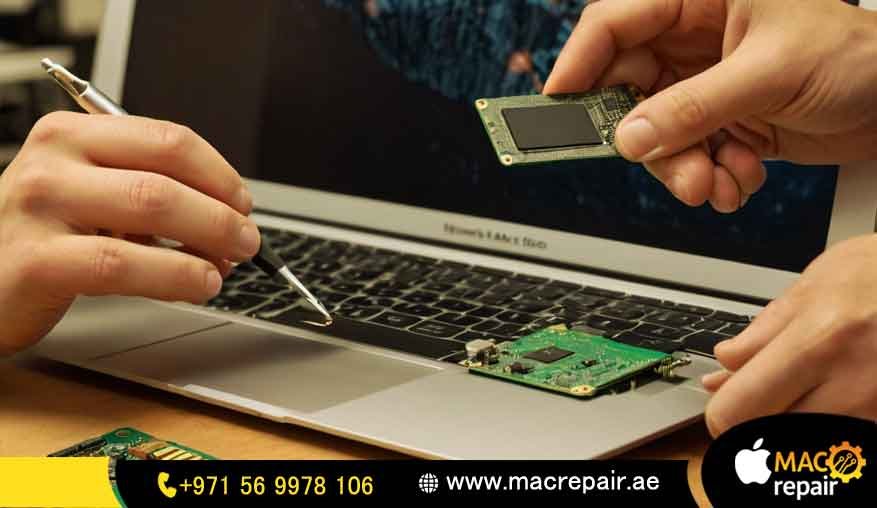
For many people with modern MacBook Airs, the only real way to get more memory after you buy it is through an expert, chip-level component swap. Most general repair shops simply do not offer this kind of service. Our MacBook Air RAM replacement Ras Al Khaimah service includes:
-
Micro-Soldering Experts: Our technicians use special, very precise tools to safely remove the integrated RAM chips already there.
-
Installing Higher Capacity: We then solder higher-capacity memory chips right onto the logic board. This is how we actually increase your system’s Unified Memory, for example, from 8GB to 16GB (it depends on your exact model’s limits).
-
Serious Testing: After the new chips are installed, we put the logic board through tough stress tests to make absolutely sure the system is stable, and everything is working perfectly.
This whole process is very technical, but it’s the only way to genuinely upgrade a post-2012 MacBook Air, which makes our specialized service the best choice if you really want maximum performance.
RAM vs. SSD: The Ultimate MacBook Air Performance Upgrade RAK
Sometimes, the slowdown isn’t just the RAM itself. A lot of users are frustrated by slow file access, and for them, an SSD upgrade or simple optimization can give a huge speed boost. We think answering the question of MacBook RAMs SSD upgrade in Ras Al Khaimah is important, so we can give you the best advice:
RAM Upgrade: This mainly makes multitasking faster, so you can run many apps at once without the computer freezing up.
SSD Upgrade: This mostly makes startup time faster, apps launch quicker, and file transferare are very quick.
For those older, pre-Retina models, getting the best MacBook Air performance upgrade might mean doing two things: upgrading the memory and swapping out an old hard drive for a modern, fast Solid State Drive. Our technicians will check your Mac for free to figure out if an SSD change will actually help more than a difficult memory service, ensuring you spend your money wisely.
Transparent Pricing for Your MacBook Air RAM Upgrade Cost RAK
We absolutely hate hidden fees and surprise costs—they’re not okay. At MacBook Repair, we believe in showing you everything clearly, so you know exactly how much to upgrade MacBook Air RAM Ras Al Khaimah will cost before we touch anything. Since the service is so different across models—from a little chip swap to complicated logic board work—our final price is based on the specific part and how complex the job is.
The Factors Influencing Your Upgrade Price
The full MacBook Air RAM upgrade cost RAK is based on these important points:
MacBook Air Model Year: Older models that use removable memory sticks (before 2012) are usually the most affordable service option.
RAM Type and Capacity: The cost reflects the memory type (like DDR3 or LPDDR4X) and the size you want (e.g., jumping from 8GB to 16GB). Those newer integrated memory chips are more expensive parts.
Service Complexity: A MacBook RAM upgrade price in RAK for a logic board chip replacement will be higher than a module swap because of the specialized labor, the expensive micro-soldering tools, and the higher risk when handling those integrated parts.
We will give you an estimated price right after we do the free check-up, and you don’t have to agree to it. Our pricing is very competitive, but we always prioritize quality parts and expert labor in the UAE, so you get the best of both.
Is a RAM Upgrade Safe for MacBook Air Ras Al Khaimah Service?
Your safety and reliability are always what we worry about most. You should never, ever feel nervous about asking, Is a RAM upgrade safe for MacBook Air Ras Al Khaimah service?
Yes, it is completely safe if qualified experts do it. If people who don’t know what they’re doing try this, especially on the models with soldered memory, there is a massive risk of permanently damaging the logic board. Our experts follow strict safety rules and use the best repair tools to make sure the process is perfect. Plus, we give you a proper guarantee on both the new parts and our work, so you can be totally sure that your investment is protected.
Ready to Supercharge Your System? Book Your macbook air memory upgrade RAK Today!
It is time to finally get rid of that frustratingly slow Mac and get the most out of your machine’s potential! Take that important next step towards a smoother, much faster computer experience with a professional MacBook Air memory upgrade RAK service that you know you can trust. Our process is designed to be very simple, fast, and not stressful for anyone living in Ras Al Khaimah.
Our Simple 3-Step Repair Process
We have made our service super quick so you can get your device back in your hands almost immediately:
-
Diagnosis: Just call us for your free first talk. We will do a full check of your memory and system to confirm exactly why it is slow and figure out the best, safest way to upgrade your specific MacBook Air model.
-
Quote & Approval: Based on what we find, we give you a clear, full quote that covers the MacBook Air RAM upgrade cost and how long it will take. We do not start any work until you say, “Yes, go ahead.”
-
Service & Return: Our MacBook service center inRas Al Khaimahh upgradesthe RAMm team does the upgrade, then we do lots of testing to make sure it performs well and is stable. Once everything is verified, your upgraded, fast MacBook Air is safely delivered back to you.
Comprehensive Laptop Repair Ras Al Khaimah Services
While you are getting your professional MacBook RAM upgrade in Ras Al Khaimah, we can help with other things too! We offer a full range of excellent repair and maintenance services, making sure your entire computer works perfectly. Our expert knowledge covers all kinds of Apple MacBook Repair:
Logic Board repairs for specific components (like fixing liquid damage or when it won’t turn on)
New screens and display replacements
Checking and replacing the battery for health issues
SSD data recovery and replacement
Frequently Asked Questions (FAQ) about MacBook Air RAM Upgrades
Q: How do I know if I need a RAM upgrade?
The clearest sign is if the Memory Pressure on your Activity Monitor is always high (yellow or red color). If your apps crash too much, loading takes ages, or your machine uses a lot of “Swap Memory” (that temporary memory on the SSD), it means your current RAM is always full, and you would really benefit from a MacBook Air memory upgraAK.
Q: What is the benefit of a professional RAM upgrade over a DIY attempt?
Doing the RAM yourself only works for a very few older models. On any new MacBook Air, the memory is soldered on, so trying to do it yourself will almost certainly cause huge, permanent damage to the logic board. Going professional means guaranteed safety, correct soldering techniques, the right parts, and a warranty—all of which stop you from making an expensive, bad mistake.
Q: Does upgrading RAM void my warranty?
An official Apple warranty might become void if someone unauthorized does the repair. But for most customers with older Macs whose warranty is already finished, this is not a problem. At MacBook Repair, we give you our own long warranty that covers the parts and the work for the MacBook RAM upgrade Ras Al Khaimah service, so you can feel completely confident in how long the repair will last and how good the quality is.
Q: Can I upgrade my M1/M2 MacBook Air RAM?
Yes, but it is not the usual way. M1 and M2 MacBook Airs use something called Unified Memory, which is built right into the main Apple Silicon chip. While it is possible, technically, to do a logic board RAM chip replacement to increase capacity (like changing 8GB to 16GB), this needs an extremely high level of micro-soldering skill. It is the most complicated and most expensive kind of memory service. But if you really need the absolute best performance from your new Apple Silicon machine, we can provide this specialized service for you.
Contact Your Local MacBook Service Center in Ras Al Khaimah
Please don’t waste another day dealing with a computer that makes you wait. Whether you just need a small upgrade or full laptop repair,Ras Al Khaimahh MacBook Air RAM services, your reliable solution is right here, locally.
Ask for Your Free Quote Now!
Contact us
📞 +971 56 9978 106 | 📧 info@macrepair.ae | 🌐 www.macrepair.ae