MacBook Air RAM Upgrade in Oman? Smart Fixes for Great Speed! Is your beloved MacBook Air starting to feel really slow? Maybe you’re juggling too many tasks, and that annoying little spinning beach ball shows up way too much, right? We totally get how frustrating it is when your reliable machine starts acting up, especially when you need things done fast in the UAE. But don’t worry! Here at MacBook Repair, we’re known as the top experts in this area. We offer smart diagnostic checks and awesome fixes to bring your MacBook Air back to its top speed. We give you honest, helpful solutions if you’re looking for a MacBook Air RAM upgrade in Oman, even if a simple “upgrade” isn’t actually possible for your model.
We Are the Trusted MacBook Repair Specialists
-
99.9% Success Rate: We’ve fixed thousands of Mac devices—you can truly trust us.
-
24/7 Expert Support: Got questions? Our tech team is ready to help and book appointments anytime.
-
Certified Technicians: We have Apple-trained folks on our team who do every job perfectly.
-
Fast Diagnostics: We’ll tell you exactly what the problem is in just a few hours, not days.
Call to Action: Stop the Lagging! Get Your Free Performance Checkup Today!
Can You Upgrade RAM on a MacBook Air in Oman? The Real Deal for M1, M2, and Older Models
Before you spend any of your hard-earned money, it’s really important to know the technical facts about your machine. The question, Can you upgrade RAM on MacBook Air Oman, has an answer that’s a bit complicated, and it all depends on how old your laptop is. For most newer MacBook Airs-especially those running the M1 or M2 chips-you can’t do a regular RAM upgrade. We always want to tell you the complete truth first. That’s how we build trust with our customers.
MacBook Air RAM Soldered vs Upgradable: What Everyone in Oman Should Know
How fast your MacBook Air runs is very much connected to how its memory (RAM) is installed inside. Understanding this tiny difference is the first step you take toward getting a proper MacBook Air performance boost.
Since around 2012, Apple has started permanently attaching the RAM right onto the main circuit board, called the logic board. They did this to make the laptop super slim and fast. But that means the RAM is now RAM fixed-it’s not like a LEGO piece you can swap out. This design is why you’re searching for an answer to the MacBook Air RAM soldered vs upgradable mystery. If you have a post-2012 model, you simply can’t change the memory chips easily. In the very new models, the memory is even more tightly built-in, a thing they call “unified memory.”
The Era of Unified Memory: MacBook Air M1 RAM Upgrade and M2 Limitations
When Apple brought out their own chips, the M1 and M2, it changed everything. These chips use something called a unified memory architecture. That means the memory is part of the main brain of the computer. This is great because data moves super fast between the brain (CPU), the graphics (GPU), and the memory. But it also means that getting a MacBook Air M1 RAM upgrade or an M2 memory bump is simply not possible.
If you bought an Apple Silicon machine, you had to choose 16 GB when you bought it. If you’re stuck with 8 GB and dreaming of that MacBook Air M2 8 GB to 16 GB RAM power, we have clever software and specialized component fixes to make your experience much, much better without needing a whole new laptop. We are experts at making your current memory work smarter, almost like it is 16 GB.
Why You Can’t Upgrade RAM on MacBook Air (Post-2012 Models)
If you’re scratching your head and asking why you can’t upgrade RAM on MacBook Air, the quick explanation is all about design. Apple wants its laptops to be the thinnest and fastest. Soldering the RAM down makes the data connection quicker and the computer skinnier. So, for machines made after 2012, the RAM amount is a permanent feature of the logic board. People often feel their MacBook Air’s performance is low because the RAM is fixed, but here at MacBook Repair, we see that limitation as a chance to give you a powerful performance upgrade in other ways.
For Vintage Models: MacBook Air 2015 RAM Upgrade and MacBook Air 2017 RAM Upgrade Oman Possibilities
Now, if you happen to have a slightly older model, like the one you might want to give a MacBook Air 2015 RAM upgrade or MacBook Air 2017 RAM upgrade in Oman, there’s good news! Even though the RAM is soldered in those too, you can often upgrade the SSD (that’s the storage drive). While it’s not a true RAM fix, boosting the SSD storage amount and speed can make the whole system feel so much faster and snappier. Our technicians will check your older machine and recommend the very best upgrade path to breathe new life into your trusted device. You’ll definitely get the most out of it!
Need More Speed? Get a MacBook Air Performance Boost with Expert Service in Oman
When the usual path for memory is closed, our deep knowledge of advanced repairs and performance tuning opens up new options. This is exactly where MacBook Repair gives you the real MacBook Air memory upgrade Oman service that you were hoping for-a massive improvement in how your laptop performs, no matter how the memory is installed.
MacBook Air Performance Boost: The Best Alternatives to RAM Upgrades in Oman
If your machine feels like it’s dragging its feet, the fix isn’t always buying new hardware. We offer great services designed to speed up MacBook Air without upgrading RAM, focusing on making everything run smoother and more balanced.
Optimize Your Workflow: Speed Up MacBook Air Without Upgrading RAM
The secret to finding the hidden speed in your MacBook Air is clever management of its resources. We offer a special service to optimize memory usage on MacBook Air by giving your software a detailed clean-up. This includes important stuff like:
-
Virtual Memory Tuning: Carefully adjusting how macOS uses the storage drive for temporary memory.
-
Startup Item Cleaning: Getting rid of unnecessary background apps that secretly eat up resources when you first turn on your Mac.
-
System Cache Clearing: Removing old, useless system files that have just piled up over time.
This detailed checkup gets to the heart of why your computer is slow. It lets your current memory handle your complex tasks much better, really helping you speed up your MacBook Air without upgrading RAM.
Advanced Optimization: macOS Memory Management, MacBook Air Service
Your Mac’s operating system is always managing memory, but sometimes, a real expert needs to step in to make it super efficient. Our macOS memory management MacBook Air service means we dive into the system tools and even the super-secret command line to make sure your heaviest apps get all the resources they need, right when they need them. We changed some settings for better memory compression and task prioritizing. This makes your experience noticeably smoother and faster-and that is super important for professionals and creatives here in Oman.
Professional MacBook Air RAM Replacement Oman (Logic Board Repair Service)
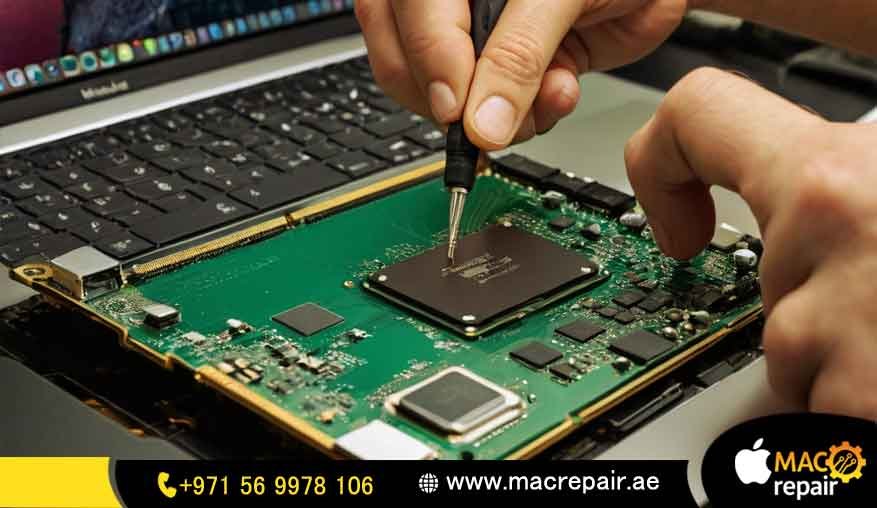
If your machine has a broken RAM chipitat requires a very high level of specialized skill. We offer Professional MacBook Air RAM Replacement Oman as a super-technical, component-level fix. Please remember, this is a replacement of broken soldered RAM chips, not a simple upgrade to a bigger size.
This special job requires advanced micro-soldering expertise to safely take out and put in new RAM chips onto the logic board. It’s often the best way to save MacBooks that have been damaged by water or electrical issues. It’s a smart and sensible choice for both the environment and your wallet, instead of buying an expensive new logic board.
MacBook Repair: The Best Company for MacBook Air Performance Enhancement in Oman
When you ask, Which is the best company for MacBook Air RAM upgrade in Oman?, you are really asking about who you can trust, who has the skills, and who offers the most complete solution. At MacBook Repair, we don’t just fix things; we give you a completely smooth, top-performing computer experience that is designed just for you.
Certified Expertise: Why Oman Chooses MacBook Repair
When your job or creativity depends on your machine working perfectly, you can’t take any risks. We are very proud to be trusted Apple technicians who deliver guaranteed quality service.
Genuine Parts Only: For any necessary MacBook Air RAM replacement in Oman, we only use the best quality components. This means your repair lasts and is reliable.
Accurate Checks: Our process starts with a careful, non-destructive check to find the real problem—is it the storage drive, the software, or the memory?
Warranty Included: All our fixes and performance boosts come with a strong warranty. This protects your investment and gives you total peace of mind.
We help you figure out if you really need a new machine for the speed you want (like a newer model with 16GB memory) or if our great service is all that’s needed to make your current MacBook Air the best MacBook Air for multitasking in Oman.
Transparent and Affordable: MacBook Air 16 GB RAM Oman Price Comparison (New vs. Service)
Choosing a repair service should be a decision you make carefully, comparing the cost of fixing your current machine against the price tag of a brand new one. The MacBook Air 16 GB RAM Oman price for a new model can be quite high.
| Option | Description | How Much Money It Cost | How Well It Performs |
| New 16GB MacBook Air | Buying a brand new machine with 16GB built-in memory. | Very expensive to start with. | The fastest, best performance for the future. |
| MacBook Repair Service | We tune up your macOS, maybe upgrade the SSD, and optimize the software. | Much, much cheaper. | Your 8GB model becomes much faster and more responsive. |
We promise to give you the most cost-effective solution. We want to help you save money while making your machine work as efficiently as possible.
Our Full Spectrum of MacBook & Laptop Repair Services in the UAE
While we are super focused on memory and performance, MacBook Repair is also a complete repair shop for all Apple and Laptop gadgets. From changing screens and replacing batteries to advanced Laptop Repair Services all over the UAE, we are the one technical friend you need.
Buying Smart: Which MacBook Air to Buy with 16GB Unified Memory for Future Needs?
If you decide that a service is just a short-term fix and you really need to buy a new machine, we are happy to give you honest, expert advice. Your satisfaction is what matters most to us, whether you choose our repair service or buy a new computer.
Which MacBook Air to Buy with 16GB Unified Memory for Future Needs?
If your daily work involves lots of intense multitasking, editing videos, or complex creative projects, we really recommend you get a model that has 16GB of unified memory. Choosing this option, even if it costs a bit more now, means you are future-proofing your Mac for many years.
Heavy-Duty Work: For programs that demand fast memory access, the 16GB is truly needed, not just a nice extra.
Long Life: If you choose 16GB today, your machine will easily handle big macOS updates and the increasingly complex software of the future.
Just chat with our team to find out more about the MacBook Air 16 GB RAM Oman price for new models. We will help you make a wise decision based on how you plan to use it long-term.
Ready for Your MacBook Air Memory Upgrade Oman Service? Book Your Free Diagnosis Today!
Don’t let a slow MacBook Air limit your work and creativity! Whether it’s a quick software fix or a very complex logic board repair,MacBookk Repair has the know-how to give you the performance boost you deserve. Our MacBook Air memory upgrade Oman service is the trusted way to a faster, more reliable laptop.
Our Simple, Easy-to-Understand Process
-
Free Diagnosis: You can drop off your device or ask for a pick-up (we offer this in some areas of Oman). We’ll check exactly why it’s running slowly.
-
Clear Quote: We give you an honest quote that explains the recommended service—whether it’s a logic board fix or just a software optimization.
-
Expert Service: Our certified technicians do the job carefully and precisely, and we keep you updated while they work.
-
Check and Return: Your super-fast MacBook Air is thoroughly tested and returned to you, ready to work its best!
Frequently Asked Questions (FAQs)
Q: Is it possible to perform a MacBook Air RAM replacement in Oman on an M1 or M2 model?
A: Yes, but only for a very specific type of repair, not a standard upgrade. If the RAM chips are broken because of water damage or an electrical issue, our special technicians can replace those broken parts on the logic board. This is a complex component-level repair and should only be trusted to certified experts like MacBook Repair.
Q: How can you speed up a MacBook Air without upgrading the RAM?
A: We concentrate on making the system run really efficiently. This involves a service to optimize memory usage on MacBook Air. We clean up system files, remove third-party apps that start automatically, and perform advanced settings for macOS memory management MacBook Air. This greatly frees up the memory you already have for the apps you are actually using.
Q: My older MacBook Air is slow. Is a MacBook Air performance boost SSD upgrade a good idea?
A: Absolutely! For older MacBook Airs (before 2017), upgrading the SSD is one of the biggest fixes you can do. A faster, bigger SSD makes the computer boot up and load apps so much quicker. It gives you a powerful MacBook Air performance boost that feels just like getting more memory. We can quickly check if your model is able to have this service done.
Q: What is the good thing about unified memory on the M1/M2 chips?
A: Unified memory is faster and saves power because the main brain and the graphics brain use the same memory pool. They don’t have to waste time copying data. That’s why an 8GB M1 Mac can often work better than an older 16GB Intel Mac. However, it’s also the reason why the memory is fixed, which confirms why you can’t upgrade RAM on MacBook Air with the new M-series chips.
Contact MacBook Repair in the UAE: Our Locations and Support Channels
We make getting your device fixed easy and simple. Contact us right now through these ways for a Free Consultation and to Book Now.
-
Phone/WhatsApp: You can talk to our support team 24 hours a day, 7 days a week.
-
Service Center Locations: Come visit our main service center in the UAE for face-to-face help.
-
Online Booking: Just use our easy website form to schedule your service right away.
Final Call to Action: Your High-Performance MacBook Air is Waiting! Click Here to Get Started!
Contact us
📞 +971 56 9978 106 | 📧 info@macrepair.ae | 🌐 www.macrepair.ae