Best MacBook Air RAM Upgrade in Ajman: Make Your Laptop Super Fast with MacBook Repair. Looking to make your slow MacBook Air fast again right here in Ajman? Hello! At MacBook Repair, we’re the guys who really know how to do a professional MacBook Air memory upgrade in Ajman. We’ll seriously boost how fast your laptop runs and how long it lasts. We totally get how frustrating it is when your MacBook Air is lagging and slowing you down. That’s why our expert team gives you solutions that are super precise and right for your exact laptop model. You can really trust our MacBook repair shop in Ajman to make your computer run smoothly as butter, so you can get back to doing your work or being creative without all those annoying stops and waits. It’s what we do best!
Why You Need to Give Your MacBook Air a Performance Boost in Ajman
Is your MacBook Air just struggling to keep up with your day-to-day work? Are you seeing that scary ‘spinning rainbow wheel’ thing way too many times an hour? If so, those are big, clear signs that the memory (that’s the RAM) currently in your laptop is just not enough for today’s demanding apps and new operating systems. Getting a MacBook Air performance upgrade in Ajman isn’t really a big expense. Think of it more like an important investment. It helps your productivity and gives a long life to your good machine.
The best thing you get from a MacBook Air hardware upgrade in Ajman is how fast your laptop responds immediately. When we do a MacBook Air memory upgrade, your machine can suddenly handle many programs at the same time. You can go from using heavy video editing software to simple multitasking with, like, a million browser tabs open. Your speed won’t drop at all! Our MacBook Air speed-up service promises that your laptop goes from being sluggish to being totally spectacular, bringing back that quick performance you expect from Apple. This simple fix, which often includes a full MacBook Air performance tune-up in Ajman, is honestly the cheapest and best way to keep your older MacBook Air useful for many, many years.
Can You Put More RAM in Your MacBook Air? Let’s Talk About Soldered vs. Upgradable
The number one thing people ask us about this service is, “Can this actually be done?” Specifically, can you upgrade RAM in your MacBook Air? The real answer, my friend, depends completely on what year your particular model is. That’s why getting a professional check is so important. For the older MacBook Air models, the answer is a big, happy YES! That makes this a really smart and worthwhile thing to do.
The Soldered RAM Problem: Why Newer MacBook Airs Cannot Be Upgraded
Ever since Apple started the Retina generation back in 2012, and definitely with all the new chips (like the M1, M2, and M3), they started soldering the RAM right onto the main board. This design is great because it makes the laptop super thin and fast. But it also means the RAM chips are stuck on permanently. Because of this, trying to do a MacBook Air M1 RAM upgrade in Ajman in the usual way just isn’t possible. You can’t replace the RAM after you buy the laptop. If you have one of these newer ones and you’re wondering why MacBook Air RAM cannot be upgraded, it’s because of this all-in-one, non-removable design. We will always tell you the truth about the MacBook Air soldered vs upgradable RAM difference, so you know the technical limits before we even talk about any repairs.
Feasible Upgrades: Your MacBook Air 2015 RAM Upgrade in Ajman and Other Older Models
But wait, there is good news! Many of the older, pre-Retina MacBook Air laptops do have ways to upgrade, and swapping out the RAM can make a huge difference. Certain models, especially from the 2012 to 2017 time frame (these have codes like A1466, A1465, and so on), can absolutely have their RAM modules successfully changed by a skilled technician using very precise soldering tools. For instance, the MacBook Air 2015 RAM upgrade Ajman service is one of our busiest and most satisfying fixes. We often take a tired 4GB or 8GB system and boost it all the way up to 16GB. Now that’s fast!
So, if you’re thinking, “Is this possible to upgrade MacBook Air RAM?”—just bring that old model right over. We can quickly tell you the highest amount of RAM it can handle and then do the very careful, high-precision work needed for a powerful and lasting MacBook Air hardware upgrade.
Good Things and Things to Think About for a MacBook Air RAM Upgrade
Making a smart choice about a MacBook RAM upgrade in Ajman is important. Our team at MacBook Repair always wants to show you both sides—the MacBook Air RAM upgrade pros and cons. That way, you can choose what’s best for your budget and how you use your laptop.
The Advantages (Pros)
The biggest and best thing you get is a massive, immediate jump in how well your system performs. With more RAM, your Mac can keep much more information ready in its active memory. This stops it from constantly having to pull files from the slower storage drive (SSD), which basically stops all those little system hiccups and delays. If you use demanding programs, like graphic design tools, or if you just love having a million tabs open, this means much less waiting around and a huge jump in what you can actually get done. Plus, getting an upgrade is much, much cheaper than buying a whole new MacBook. It’s a great way to give a perfectly fine piece of hardware many extra years of life.
The Things to Think About (Cons)
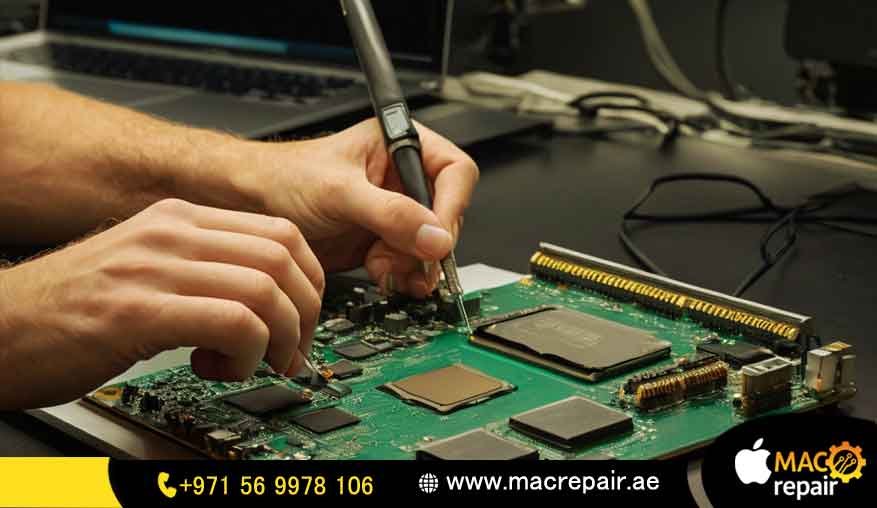
The main issue is that most newer models simply cannot be upgraded because of the soldered RAM. For the older models that can be upgraded, the risk comes from how complicated the job is. It’s definitely not something you should try doing yourself! Replacing RAM on a MacBook Air means getting right down to the main logic board, and that needs special tools and extreme care. Choosing a less experienced laptop repair in Ajman MacBook Air ram can sometimes mess up your machine forever. But when you pick MacBook Repair, you don’t have to worry about that at all. You can relax knowing our certified technicians are on the job, backed by our full service guarantee.
Honest Pricing: Transparent MacBook Air RAM Upgrade Cost in Ajman
We believe in being 100% honest with you, especially when we talk about the big question: MacBook Air RAM upgrade cost in Ajman. The final amount you pay is based on how complex the labor is and the price of the high-quality RAM parts we need for your particular model. We are not a general repair shop. Our prices for a MacBook Air memory upgrade in Ajman are specifically figured out for the delicate, high-skill technical work needed for Apple’s component-level fixes.
Breakdown: MacBook Air RAM Replacement Price Ajman
When you are planning your budget for a MacBook Air RAM replacement price in Ajman, you have to factor in getting original, compatible parts and the high-level expertise needed to safely work with the components on the old units. The cost for a full RAM replacement usually starts around it changes depending on your exact model (like an A1466 compared to a much older, easier one) and how much RAM you want (e.g., going from 4GB to 8GB, or 8GB to 16GB). This cost is usually way less than half of what a new laptop would set you back. Please don’t hesitate to ask us how much to upgrade MacBook RAM in Ajman! Just give us your MacBook Air model and year, and we’ll send you a fast, precise quote without any pressure. We make sure our MacBook memory upgrade cost in Ajman is competitive, but we never compromise on the quality of the parts or the skill of our technical team.
Our Pro MacBook Air RAM Service in Ajman (Why Choose MacBook Repair)
Choosing MacBook repair means you are getting specialized skills that those general repair places just don’t have. We are a dedicated MacBook repair shop, Ajman ram upgrade experts. We only focus on Apple devices and all the tiny details of how they are built. This focus on only Mac Air ram service in Ajman lets us give you an unmatched level of care, quality checking, and guaranteed successful repairs. Our techs are certified in those fine micro-soldering skills that are needed for so many MacBook Air board fixes. We use only top-grade, totally tested RAM modules that are guaranteed to perform well and last long, making sure your newly upgraded system is reliable for years. We are truly proud to be the best choice for laptop repair, MacBook Air RAM services.
The MacBook Repair Process: From Free Checkup to Performance Tune-Up
Our full service is designed to be super easy and worry-free for you. It all starts with our free pickup service, available all over Ajman. Then we do a free, no-strings-attached checkup to confirm the RAM upgrade is possible and that nothing else is wrong. Once we confirm it’s good to go, our certified team performs the MacBook Air RAM replacement in Ajman using the best tools. This main service includes a detailed Ajman MacBook Air servicing memory upgrade package, meaning we also clean up the inside of your laptop and make sure everything is optimized. The very last step is super tough testing, and then we safely and quickly deliver your laptop back to you, complete with a service warranty. We pay close attention to every detail, which is how we guarantee a successful MacBook Air performance tune-up in Ajman.
RAM Upgrade Plus a Freebie: MacBook Air SSD Upgrade in Ajman
For older MacBook Air models, getting more RAM is just the first step to making it as fast as possible. If you really want a completely new feeling system, we strongly suggest you combine your memory upgrade with a MacBook Air SSD upgrade in Ajman. The Solid State Drive (SSD) is what makes your laptop boot up fast, load apps in a flash, and handle file transfers super ququicklyBy putting in a bigger, faster SSD right along with your RAM replacement, you are giving it a complete MacBook Air hardware upgrade. This makes sure your active memory and your file storage are both working at the absolute best speed. This combo upgrade is the ultimate way to future-proof your machine, you see!
Frequently Asked Questions (FAQ) about MacBook Air Memory Upgrade Ajman
Q: How do I really know if my MacBook Air needs a RAM upgrade? A: You probably need one if your system is always running slow, programs keep crashing on you, or things take a long time to load. If you check the Activity Monitor and it says your memory usage is always at 100%, you definitely need more memory, for sure.
Q: What is this “soldered RAM,” and why is it a problem for upgrading? A: Soldered RAM just means the memory chips are permanently attached (like welded) right onto the main board. All the newer (after 2017) MacBook Air models use this design. It means you or anyone else can’t service or upgrade the RAM after you buy it. We only do upgrades on those older models where the way the computer is built allows us to do it.
Q: If I upgrade the RAM, does it make my Apple warranty useless? A: For older MacBook Air models that are already outside their original warranty time, having a professional do an upgrade won’t hurt how your device works. Since the new models (M1, M2, etc.) can’t be upgraded anyway, this question usually doesn’t apply to the ones we can actually fix. Don’t worry, we give you our own full service warranty!
Q: How long does the MacBook Air RAM replacement service actually take? A: For the eligible models, the whole MacBook Air memory upgrade process—starting from the first checkup all the way to installing and testing—usually takes about 24 to 48 hours. Our service is quick and reliable, so you get your laptop back fast.
Q: Can you do a RAM upgrade on my MacBook Air (A1466)? A: Yes! Models like the MacBook Air A1466 (which were mostly sold from 2013 to 2017) are often perfect for a memory upgrade. We can successfully get these models up to the maximum memory they can handle, giving you a huge jump in speed.
Want Fast Speed Now? Book Your MacBook Air RAM Upgrade Today!
Don’t let a slow computer tell you what you can and can’t do, or cut the life short of your important MacBook Air. It’s time to take charge of your device’s speed and efficiency. Our expert service for MacBook Air RAM upgrade in Ajman is the fastest and most trustworthy way to boost your performance without having to spend a huge amount on a brand-new laptop.
Get a Quick, No-Obligation Price Estimate for Your Exact MacBook Air Model
Call us today or use the form on our website to get your free consultation started. Just tell us your MacBook Air model and year (like MacBook Air 13-inch, Early 2015, A1466) and the amount of RAM you want. Our specialists will quickly give you a precise price estimate for your MacBook Air RAM upgrade in Ajman. No pressure, just honest info.
Your Trusted Neighbor: MacBook Repair Shop Ajman
We are way more than just a repair spot; we are your local, dedicated MacBook repair shop, Ajman ram upgrade specialists. We are really committed to helping the whole community in the UAE with their technology needs.
Where We Offer Service and Coverage Across Ajman
Even though our main shop is where the magic happens, we offer easy pickup and drop-off services all over the main areas in the Emirate. This includes Ajman, Al Nuaimiya, Al Jurf, Al Rashidiya, and the Ajman Industrial Area. Our main goal is just to make getting your MacBook Air memory upgrade in Ajman as convenient and easy as possible, so you don’t lose much work time.
How to Contact Us and Our Business Hours
Address: [Your Detailed Ajman Address Here for Navigational Intent]
Phone: [Your Primary Contact Number]
Email: [Your Professional Email Address]
Working Hours: [Your Working Hours, e.g., Sat-Thu, 9:00 AM – 8:00 PM]
Contact us
📞 +971 56 9978 106 | 📧 info@macrepair.ae | 🌐 www.macrepair.ae